
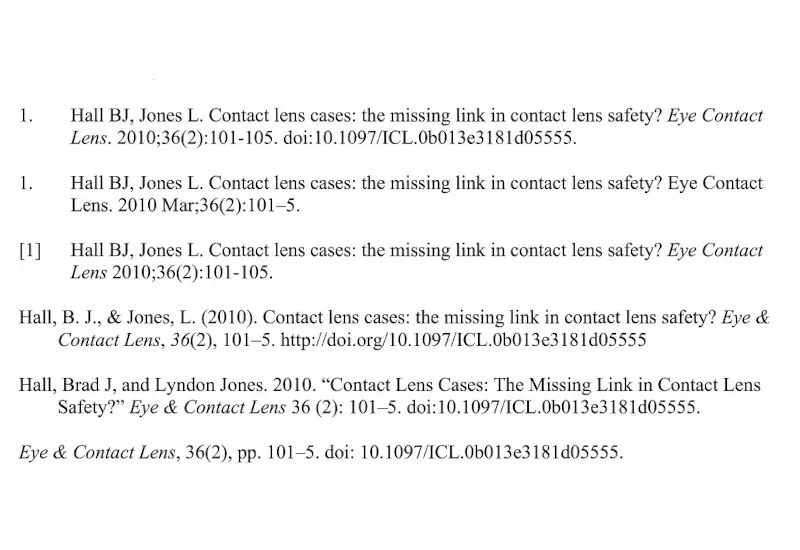
Changing a citation style should be simple. The risk is assuming the software has made every reference correct.
Mendeley Cite can change in-text citations and the bibliography across a Word document. It cannot decide whether the selected style matches the target journal’s current instructions, and it cannot repair incomplete or incorrect source metadata without your input. The practical workflow is: select the closest current style, test it, verify it against the journal, and customize only when necessary.
What Mendeley Cite can—and cannot—do
A citation style is a set of formatting rules for in-text citations and bibliographies. It controls numbering, author display, punctuation, journal abbreviations, volume and issue formatting, and the order of reference elements.
Mendeley Cite applies those rules across a Word document. This is useful when you change target journals or move between an author–date style and a numbered style such as Vancouver.
However, automation does not remove author responsibility. The International Committee of Medical Journal Editors states that authors are responsible for citation accuracy and should consult the journal to which they plan to submit. You need two checks:
- Style check: Does the output follow the target journal’s current instructions?
- Source check: Are the authors, title, journal, year, volume, issue, pages, DOI, and other fields accurate in Mendeley?
A perfectly applied style will still produce a bad reference when the underlying record is wrong.
If you are setting up Mendeley as your reference manager, clean the library before formatting the final manuscript. Correcting records once is more reliable than patching the same errors repeatedly in Word.
How to change a citation style in Mendeley Cite
Elsevier’s current support workflow uses the Citation Settings tab in Mendeley Cite.
1. Open Mendeley Cite in Word
Open a copy of your manuscript, then open the Mendeley Cite add-in. Working in a copy protects the submission version while you test a different style.
2. Open Citation Settings
Select Citation Settings. Mendeley Cite displays the current citation style, citation language, and a preview of the output.
3. Select Change citation style
Choose Change citation style. Select the required style, then use Update Citation Style to apply it.
Do not stop at a broad label such as “Vancouver.” Journals can use variants that differ in punctuation, author truncation, abbreviations, DOI display, or electronic-publication details.
4. Search for the journal or style
If the required option is not visible, select Search for another style. Search by journal title first, then by the named style in the journal’s instructions.
Apply the closest verified match and inspect several reference types—not just one article. Check:
- an article with many authors;
- an article with an electronic article number;
- a book or chapter, if cited;
- a website or online report;
- a reference with a DOI;
- any in-press item.
This exposes differences that a single example can hide.
How to add or edit a custom citation style
If the available style does not match the journal’s instructions, Mendeley Cite provides Add a custom style. Mendeley styles use Citation Style Language, or CSL, an XML-based format that defines citation and bibliography rules.
Elsevier directs users to the CSL Editor to create or modify citation styles. The independent CSL style editor can search by style name, journal title, or a formatted example.
Use this escalation path:
- Search for the exact journal style.
- Search for the named base style.
- Use search by example to find a close match.
- Modify a copy of the closest style in the CSL Editor.
- Add the custom style to Mendeley Cite and test it in a manuscript copy.
Do not edit CSL merely because one reference looks wrong. Check the source record first. If the DOI, page range, issue, author names, or publication type are incorrect, changing the style hides the symptom rather than fixing the data.
Run a reference audit before submission
Compare the Word output with the target journal’s current instructions for authors. Do not rely on an old screenshot or tutorial.
Check in-text citations
Confirm:
- author–date, numbered, bracketed, or superscript format;
- citation order and numbering;
- formatting of multiple and repeated citations;
- placement relative to punctuation;
- author display and use of et al. where applicable.
Check the bibliography
Confirm:
- reference order;
- author names and truncation rules;
- title capitalization and journal abbreviations;
- year, volume, issue, pages, or article number;
- DOI and URL format;
- punctuation, spacing, italics, and bold text;
- treatment of online-first, preprint, and in-press records.
ICMJE also advises authors to verify references using a bibliographic source such as PubMed or the original source. That is a data-accuracy check, not a formatting check. You need both.
Common failure modes
You selected a familiar style instead of the journal’s current style
“Vancouver” is not enough if the journal specifies a named variant. Start with the instructions for authors, not your previous manuscript.
The reference record is incomplete
Missing issue numbers, article numbers, dates, or DOIs can make a correct CSL style look defective. Fix the Mendeley record, refresh the citation, and check again.
You edited the bibliography directly in Word
Manual edits can be overwritten when Mendeley Cite refreshes the document or when you change styles. Correct the source record or CSL rule instead. If a manual intervention is unavoidable, make it only in a controlled submission copy after the reference list is stable.
You customized the style too early
A maintained journal-specific style may already exist. Search first. Customization adds another file that your team must name, store, test, and transfer correctly.
You checked only one reference type
A style can format an article correctly and still mishandle a chapter, website, dataset, or electronic article number. Test the types in your manuscript.
Complete the manuscript-submission check
Citation formatting is one part of manuscript preparation. Confirm the full journal package: article structure, word count, tables, figures, reporting guideline, declarations, supplementary files, and reference requirements.
Use Sengi’s guides to format the full manuscript for an ophthalmology journal and prepare the manuscript for submission.
The safe sequence is straightforward: verify the journal instructions, change the style, correct source records, test all reference types, and audit the final output. Let the software handle repetition. Keep the judgment.